Your AI tools have limits. Checking them shouldn’t be a task.
See how much you’ve used, how much is left and when your usage limits reset—for Claude, Codex and Cursor, in one menu bar panel.
 Claude
 Codex
 Cursor
Free and open source · Version 0.4.0 · macOS 27 · Apple Silicon

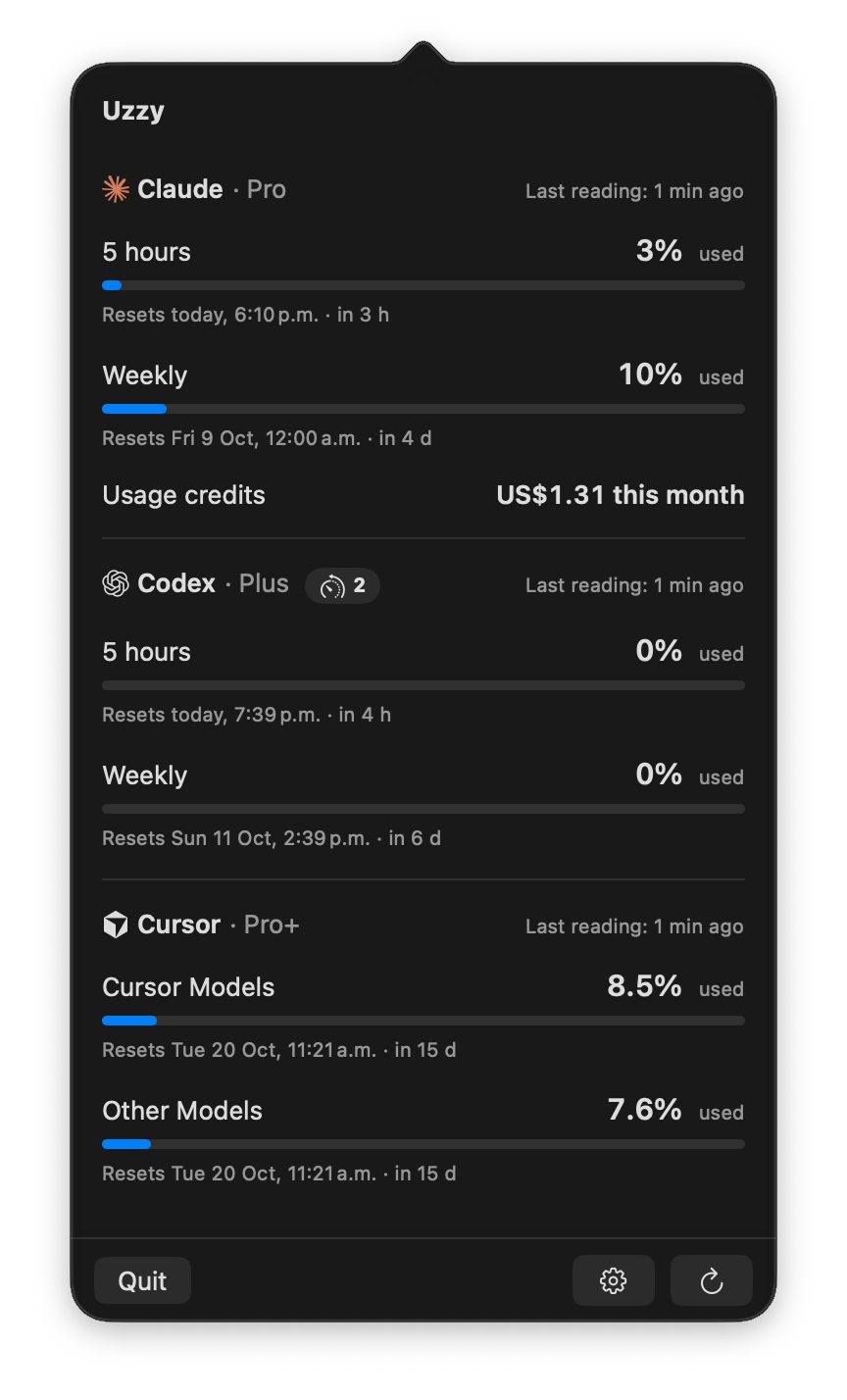


Different tools. One place to check.
Keep using Claude, Codex and Cursor. Uzzy brings their usage limits together so you can stop checking each one separately.
Three tools. One quick check.
Open Uzzy from your menu bar to see Claude, Codex and Cursor together, with a separate card for each provider, led by its logo and showing its plan.
Different limits stay different.
Check each usage limit on its own, with its reset time, countdown and last reading. Five-hour and weekly limits are never blended into one number.
Checks while you look.
Uzzy refreshes readings when needed as you open the panel, then every five minutes while it stays open. Close it and the requests stop.
Missing doesn’t mean zero.
If a session expires or a provider can’t be reached, Uzzy tells you what happened. The other providers keep working.
Your tools already know you.
Uzzy reuses the sessions Claude Code, Codex CLI and Cursor already keep on your Mac. No extra sign-in. No API key to paste. Use one, two or all three.
Claude
Reuses your Claude Code session. 5 hours, weekly, weekly per model, usage credits this month, credit balance, cloud session credits.
Codex
Reuses your Codex CLI (ChatGPT sign-in) session. 5 hours, weekly, extra limits, banked resets, credit balance.
Cursor
Reuses your Cursor session. Weekly usage on unified plans, Cursor Models and Other Models on legacy plans, credit balance.
Set it up your way, or don’t.
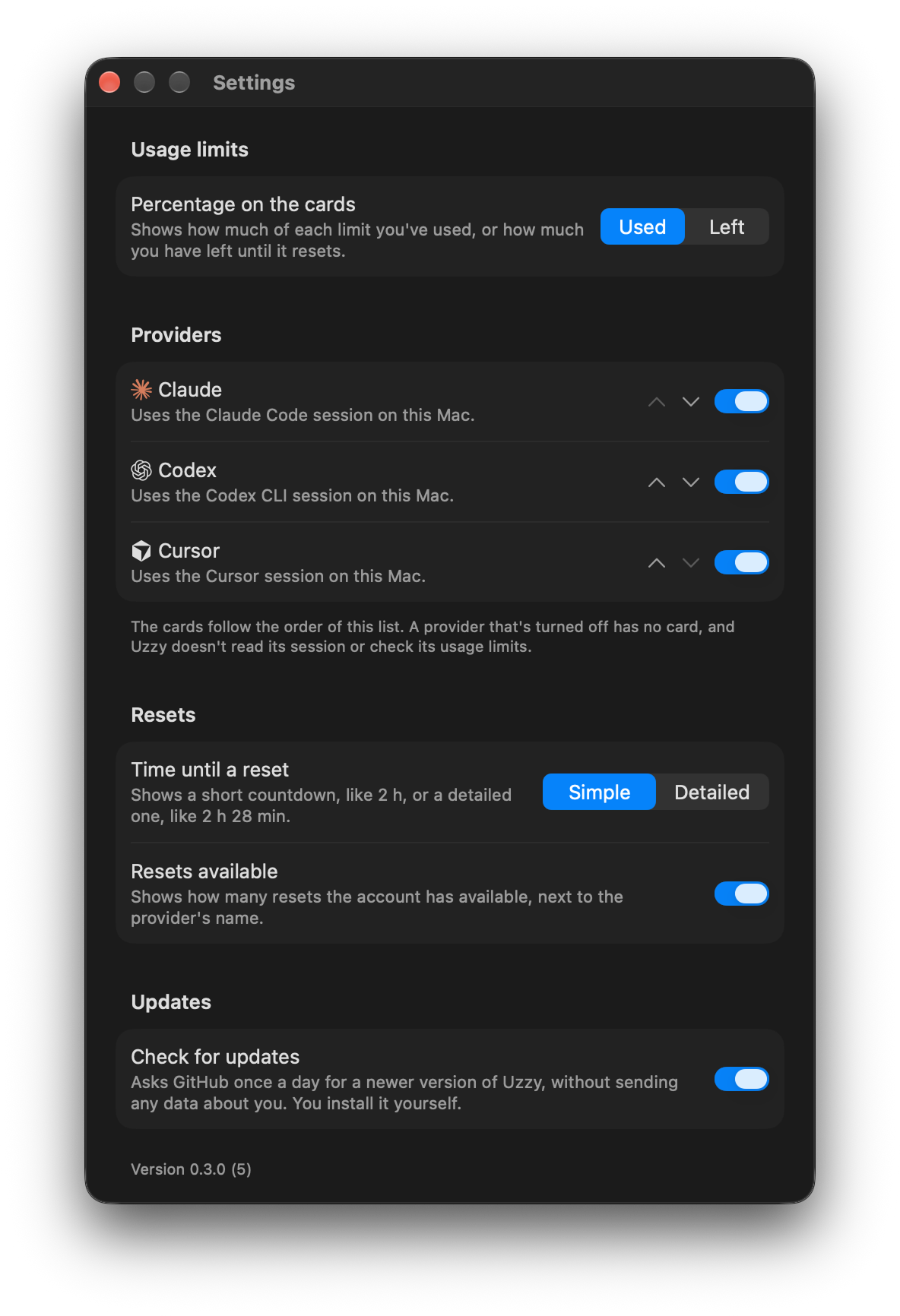
Open Settings with ⌘, from the panel. Your choices are remembered across launches, and the installed version is shown at the bottom.
Used or left.
Choose whether the cards show how much of each usage limit you’ve used or how much is left.
Only the tools you use.
Turn off the providers you don’t use. They get no card, and Uzzy doesn’t read their session or query their usage limits.
Your order.
Move the cards up or down so the provider you check most comes first.
Short or detailed countdowns.
See the time until a reset as a short countdown, like 2 h, or a detailed one, like 2 h 28 min.
Resets available.
Show how many resets the account has available next to the provider’s name, or hide the badge.
Updates on your terms.
Once a day Uzzy asks GitHub for a newer version, without sending any data about you. Turn the check off whenever you like; you install updates yourself.
Your credentials stay where they are.
Read-only access.
Uzzy reuses your existing sessions. It never asks for a password, signs in for you or writes credentials. It reads Cursor’s encrypted session only after you allow access to its key in the Keychain.
Straight to your providers.
Usage and balance requests go directly to Claude, Codex and Cursor. Once a day Uzzy asks GitHub for the latest version, unless you turn that off. No telemetry. No server of its own.
api.anthropic.comchatgpt.comapi2.cursor.shapi.github.comReadings stay in memory.
Uzzy doesn’t save usage readings to disk.
The practical details.
Do I need Claude, Codex and Cursor?
No, one is enough. Turn off the ones you don’t use in Settings: their cards go away and Uzzy doesn’t read their sessions.
Do I need another account?
No. Uzzy reuses the sessions Claude Code, Codex CLI and Cursor keep on your Mac. You’ll need to be signed in to the tools you want to check.
Where does my data go?
Uzzy queries your providers directly using your existing sessions. It has no server of its own and sends no telemetry.
What if a reading is unavailable?
Uzzy explains what went wrong. If it has an earlier reading for the same account, it shows it as out of date. Missing data is never shown as zero.
How do I update Uzzy?
Uzzy doesn’t update itself. When a newer version is published, an Update button appears next to the name in the panel and downloads the new Uzzy.dmg. Install it the same way as the first time.
Tell me what you think.
I’m @akacronos, a designer who got tired of checking three places, so I built Uzzy. Found a bug, have an idea or want another provider? Send me a message on X. You don’t need to know how to code.