 Claude
 Codex
 Cursor



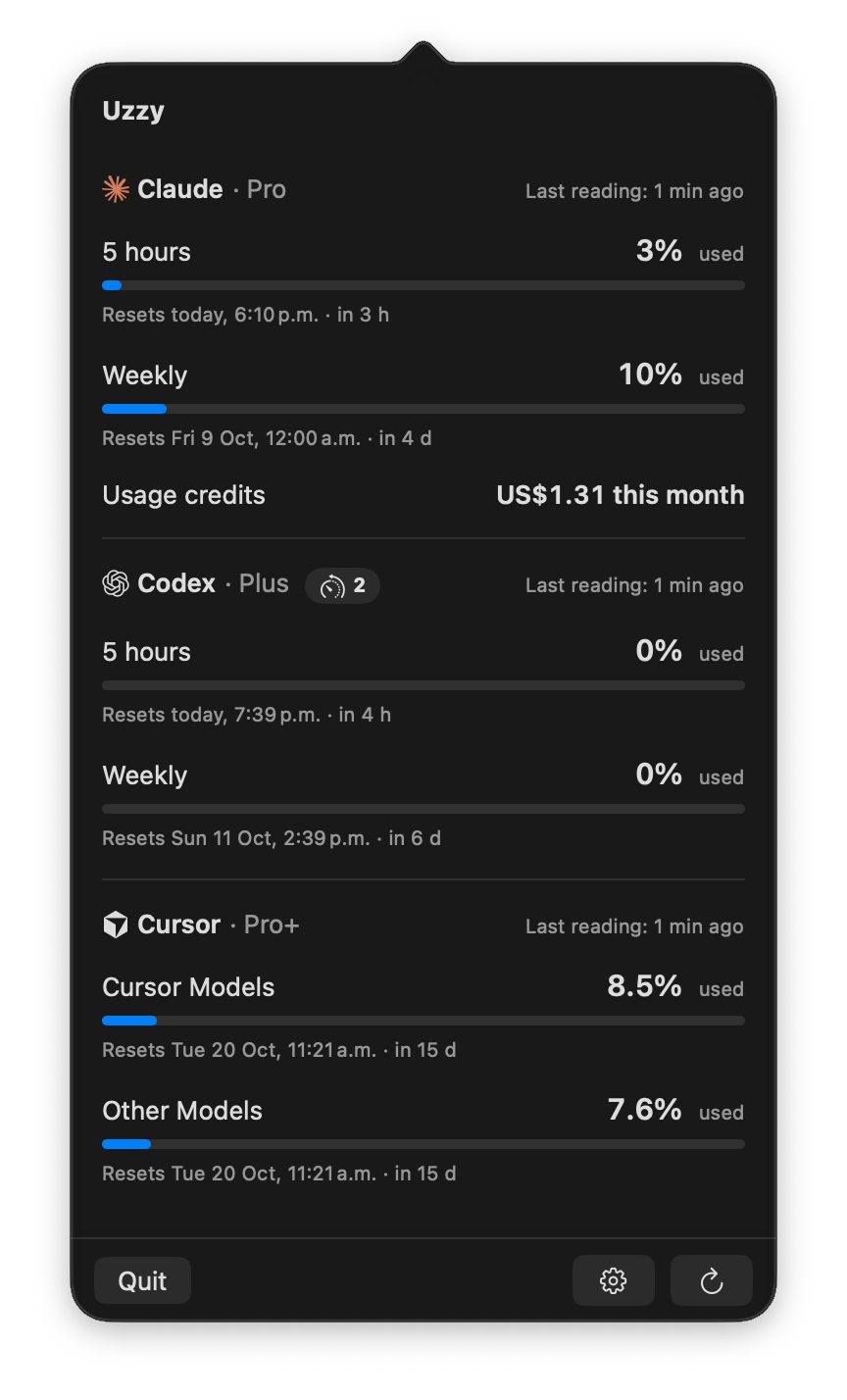
Every limit stays separate
Five-hour, weekly and per-model usage limits are never blended into one number. Each keeps its own bar, reset time and countdown.
See what you’ve used, what’s left and when your usage limits reset for Claude, Codex and Cursor, right in your menu bar.
Free and open source · Version 0.6.2 · macOS 27 · Apple Silicon
Uzzy reuses the existing sessions on your Mac to check usage limits directly with each provider. No extra sign-in, no API keys, no Uzzy server, and readings stay in memory only.
api.github.comapi.anthropic.comchatgpt.comapi2.cursor.shHover any logo to see the exact host Uzzy connects to.
Five-hour, weekly and per-model usage limits are never blended into one number. Each keeps its own bar, reset time and countdown.

If a session expires or a provider can’t be reached, Uzzy explains why and keeps your last reading marked out of date.


Refreshes only while the panel is open. Turn on background refresh in Settings to get notified near your threshold, at 100%, or on reset.

Open Settings with ⌘+, from the panel.
Show how much of each usage limit you’ve used, or how much is left.
Pick short (2 h) or detailed (2 h 28 min) countdowns, and turn resets available on or off.
Checks GitHub once a day for new releases with no data about you. Turn it off anytime.
I’m @akacronos, a designer who got tired of checking four places, so I built Uzzy. Found a bug, have an idea or want another provider? Send me a message on X.
Uzzy reads the local sessions on your Mac in read-only mode and calls the same endpoints the official apps use. Usage percentages and reset times come straight from each provider, never estimated or scraped.
Yes. Background refresh and notifications are turned off by default. Turn them on in Settings to get notified near your threshold, at 100% used, or when a limit resets, with no extra Keychain prompts.
No. Usage readings stay in memory only and are never written to disk. Only your preferences are saved locally. There is no Uzzy server and no telemetry.
Because Uzzy uses undocumented endpoints, a provider can change them without notice. When that happens, Uzzy explains the error and keeps your last reading marked out of date instead of showing 0%. I work on a fix as soon as possible and ship an update once one is found.
Uzzy doesn’t auto-update. If update checks are turned on in Settings, it checks GitHub once a day and shows an Update button in the panel when a new Uzzy.dmg is out.
Your AI usage limits and reset times, one click away.
Download for MacmacOS 27 · Apple Silicon · Open source, MIT


